
Async Code in Node.js: Callbacks and Promises
Why async code exists?
Why does async code exist in nodejs? Because we're humans and everything we develop is but a reflection of our values and workings.
Computers are asynchronous by design.
Asynchronous means that things can happen independently of the main program flow.
The above code definition is by nodejs docs. Unlike multi-threaded runtime environments that handle concurrent tasks by spawning new threads, Node.js runs on a single-threaded Event Loop.
If Node.js executed code synchronously—meaning line by line, waiting for every database query or file read to finish—the entire server would freeze whenever an input/output (I/O) operation occurred. Asynchronous architecture exists to keep the main thread free, allowing Node.js to process thousands of incoming requests simultaneously without getting blocked.
File Reading
File reading is a pretty fundamental and reused function of any software, but the way to do it is pretty resource exhaustive. Also, time required to
Fetch a file
Read from it
Extract data from it
Manipulate file structure or data
are pretty time consuming tasks. Hence if any software be it web, mobile or other some other form would stop all its operation when encountering a file, that would be catastrophic for the service and its workings.
Hence, our asynchronous nature of nodejs allowed us to perform some tasks which require extra resources parallely while other code blocks executed.
To stay fast and handle thousands of concurrent requests, Node.js uses asynchronous, non-blocking I/O. Instead of freezing the thread during disk/network tasks, Node offloads the heavy lifting to system threads and continues running other code.
Callback-Based Async Execution
A callback is simply a function passed as an argument to another function, which gets executed once an asynchronous operation completes.
const fs = require('fs');

console.log('1. Script started');

// Non-blocking file read
fs.readFile('user.json', 'utf8', (err, data) => {
  if (err) {
    console.error('Error reading file:', err);
    return;
  }
  console.log('3. File content retrieved:', data);
});

console.log('2. Script finished running main thread');
Step-by-Step Callback Flow
Initiation:
fs.readFilestarts reading the file on an OS-level thread.Offloading: Node registers the callback function in memory and immediately returns execution back to the main thread.
Non-Blocking Execution:
console.log('2. Script finished...')runs right away without waiting for the file read.Completion: When the file system finishes reading, an event pushes the callback to the event queue. Once the main call stack is clear, Node executes
console.log('3. File content...').
This worked fine, for a while. The biggest problem it faced was Callback Hell. Doesn't it sound cool?
// Reading user -> reading permissions -> writing log
fs.readFile('user.json', 'utf8', (err, userData) => {
  if (err) return console.error(err);

  fs.readFile('permissions.json', 'utf8', (err, permData) => {
    if (err) return console.error(err);

    fs.writeFile('log.txt', 'Activity completed', (err) => {
      if (err) return console.error(err);
      console.log('All operations complete successfully.');
    });
  });
});
This actually is a hellish approach for us developers.
It had some Major Pitfalls:
Pyramid of Doom: Deep nesting makes the control flow hard to read and track visually.
Repetitive Error Handling: You have to check
if (err)manually inside every single nested layer.Inversion of Control: You rely on external parameters executing your callbacks at the right time and state.
Promise based async handling
A Promise is an object representing an asynchronous task that would eventually either be resolved or rejected.
const fs = require('fs/promises');

fs.readFile('user.json', 'utf8')
  .then((userData) => {
    return fs.readFile('permissions.json', 'utf8');
  })
  .then((permData) => {
    return fs.writeFile('log.txt', 'Activity completed');
  })
  .then(() => {
    console.log('All operations complete successfully.');
  })
  .catch((err) => {
    // Centralized error handling
    console.error('An error occurred anywhere in the chain:', err);
  });
With each .then() function chained, the data is transferred from the primary function to the .then() function. The standard approach is:
.then()block is used for the resolved scenario. And though we can handle the rejections this way too we use,.catch()block for the error scenario.
Promises vs Callback
Feature | Callback Chain | Promise Chain |
Visual Flow | Nested horizontally ("Pyramid of Doom") | Linear top-to-bottom pipeline |
Error Handling | Repeated | Single |
Return Values | Functions return | Functions return a |
Composition | Difficult to combine or coordinate | Easy via |
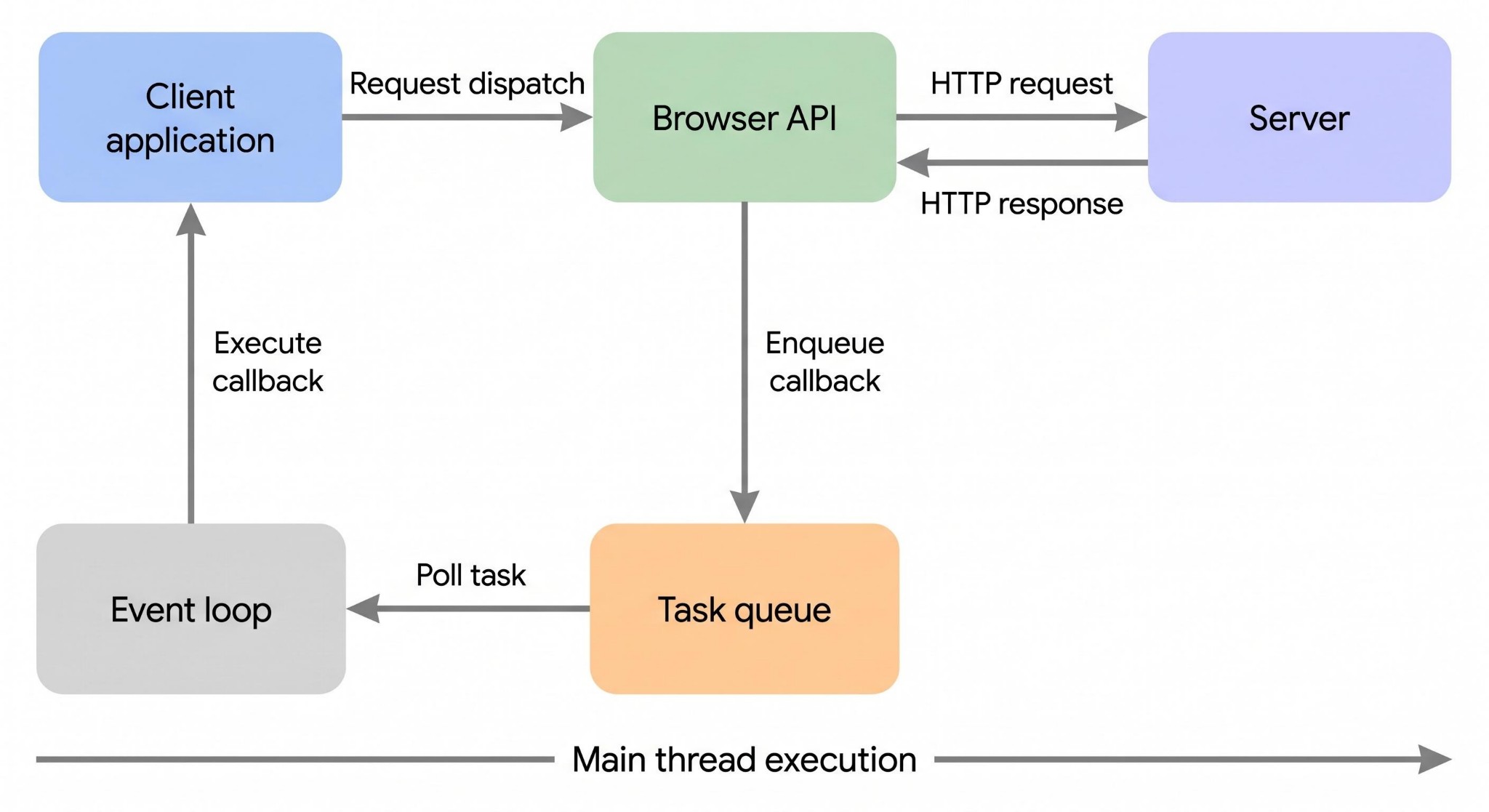
A basic interpretation of how a nodejs js code executes.
Conclusion
Hope you're having a good day and this brief article made it a little bit more informative.
This is basically how asynchronous is in the nodejs.